rss

Modular Diary – 004

The only thing with the iPad as an interface is it’s not quite possible to ‘play’ those knobs in the way that, say, Mylar Melodies might.

I decided to take a look at another modular synth on the iPad – Moog’s recreation of the Model 15. The attention to detail in this app is incredible, both from an aural and a visual/interface point of view. It looks and sounds amazing.1 Unlike the Ripplemaker, there is too much to fit onto the screen at once, and so one has to get used to scrolling around and zooming in and out. While sliding around the interface is an unfortunate necessity, the ability to zoom in on a specific module or knob and make adjustments with an incredible degree of finesse (there’s also a handy little tooltip at the top of the screen) is something that I miss when moving back to the Ripplemaker.

One drawback with the Moog app is that one can only adjust a single control at a time. Tom Simmert got around that by building a custom MIDI controller specially for it. Patching still takes place on the screen, but there’s a physical knob for each control.

And that takes me back to an aspect that I’ve been enjoying with making music on the iPad – the fact that there needn’t be an intermediary controller.


  1. Since it’s modules are running constantly, even if there’s no sound coming out of them (as is the case with Audulus), the app uses quite a lot of CPU power, and so the visual aspects are handled using Apple’s Metal framework. ↩
Modular Diary – 003

I wasn’t in a position to get hold of an O-Coast though, and as much as Robert Syrett’s Audulus ‘O-Toast’ provided a fascinating look into how the MakeNoise synth was put together I found it frustrating to play with – at least when attempting to recreate O-Coast patches from the MakeNoise manual or their series of video tutorials. (One can get a lot out of the O-Toast, but it is perhaps better approached as a thing on it’s own.) Fortunately around that time Bram Bos’s Ripplemaker appeared and I turned to it as a software version to play with.

The Ripplemaker is well made, clearly layed out, and easy to patch. The inclusion of a sequencer along with having all controls comfortably visible on a single screen makes it a lot of fun to play with. (It also integrates nicely as an Audio Unit within an apps such as Jonatan Liljedahl’s AUM.) One can also adjust more than one control at a time, which is an advantage over Audulus’s lack of multitouch control on iOS, and having the workings of the softsynth thoroughly taken care of means that one can get on with exploring its sounds.

Modular Diary – 002

For a long time I’d shied away from looking at the modular world more closely simply because the cost of the hardware put it out of reach. Discovering the MakeNoise O-Coast on the Audulus forum a few moths ago awoke my interest – it was affordable and manged to pack enough into its compact form to get going with some generative patches. And that was what I found myself longing for – spending some time directly involved with sound without the implied direction of a keyboard or DAW. An instrument to listen to and interact with: ‘Watching’ the sound and making adjustments to steer its course.

Modular Diary – 001

I’ve been toying around with the idea of a third 100 Day Project – this time with modular synthesis as its theme. I don’t have any modular gear but I do have Audulus. While remaining a somewhat open (visual) programming environment for creating sound, Audulus has embraced modular synthesis as a model and provides a number of modules as basic building blocks. Recently there’s been a lot of activity on the forum focussed around recreating (Eurorack) hardware modules. I’ve been digging through the threads, looking at videos and schematics, and generally learning a lot.

I thought it might be useful to get some of the journey written down.

I noticed this thread in the Audulus forum – a kind of communal diary documenting a shot at recreating the MakeNoise O-Coast modular synth.

That got me curious about the synth itself.

Here’s a fine introduction to it.

And here’s the manual.

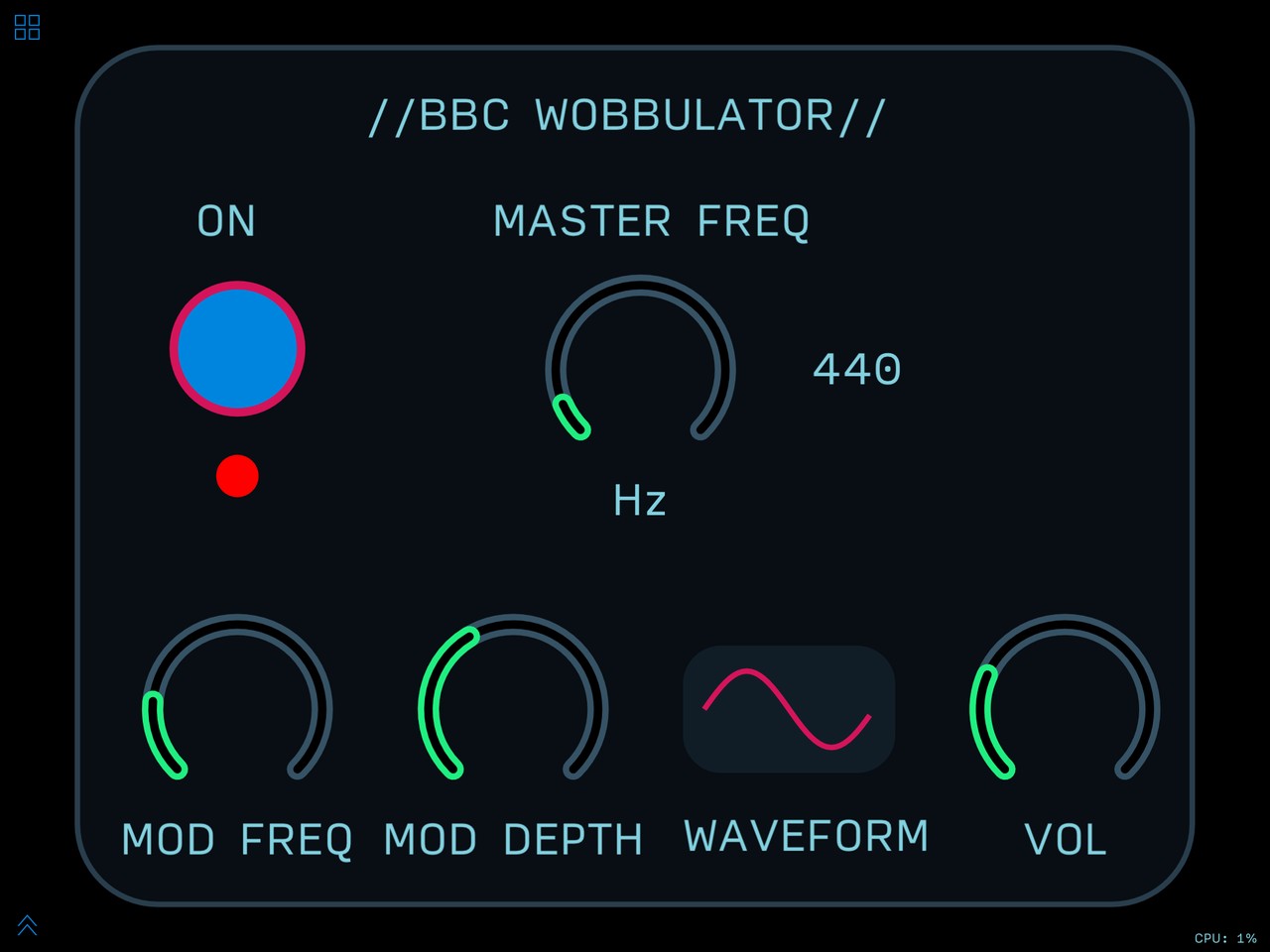
This is really simple – but, for the fun of it, here’s an Audulus version of the BBC’s Web Audio reconstruction of the Radiophonic Lab Wobbulator.

The patch can be downloaded here, or via the Audulus Forum.